Cart
Cart
 Track
Track
 Login
Login


How do i register for SecureGo?
Register for SecureGo via My Astro app v6.2.0 and above, available on the Google Play Store or Apple App Store.
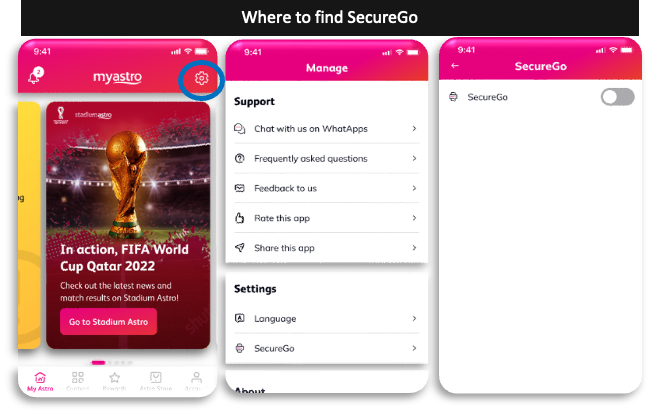
Launch the My Astro app, tap the gear icon on top right of the screen to go to Manage and tap on SecureGo under Settings. Tap to toggle on SecureGo.
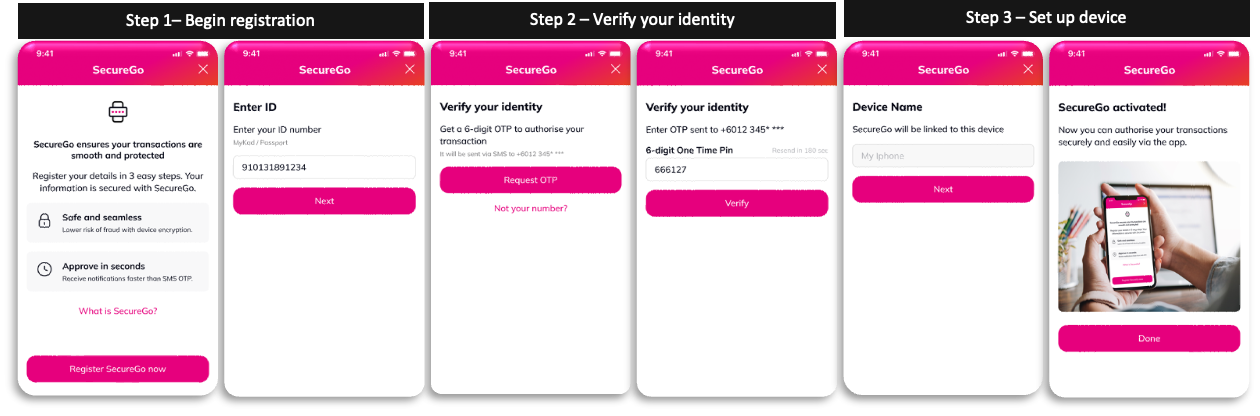
Step 1: Enter your ID number
Step 2: Verify your identity with WhatsApp OTP sent to your registered mobile number
Step 3: Set up your device name, and you're good to go!